
––– SAMSUNG –––
The World’s first TV configurator
I led creative and design to create a guided shopping experience to help Samsung customers choose their perfect TV
Role
Creative Director, UI/UX Design Lead
Project
E-commerce, Brand Content
Agency
Publicis Razorfish, New York
Timeline
2019 — 2020
Role and responsibilities
I led creative and design to create a highly interactive, joyful consumer tool that turns the most overwhelming purchase in consumer electronics into a guided, personal, five-minute decision — built for samsung.com across 26+ global markets.
Business Impact
1st
of its kind — no TV manufacturer had shipped a configurator built around a guided shopping experience
30%
increase in browse-and-buy paths — the gap Find My TV was designed to close.
26+
global markets the experience was built to scale into, from a single US pilot
Challenge
Decoding tech specs
Samsung's TV range had grown into one of the widest in the industry — screen sizes, resolutions, panel types, smart features and design styles compounding into a decision most shoppers weren't equipped to make. Research into the category was blunt: shoppers weren't browsing with confidence, they were bracing for confusion.
The business need was just as sharp. Samsung needed online conversion, stronger brand affinity, and — critically — a higher attachment rate, getting customers into bigger screens, better product lines, and a TV that actually fit how they lived, not just what was on sale that week.
Research
TV shoppers everywhere are overwhelmed by so many choices
Category research with over 16,000 respondents surfaced a consistent emotional pattern, one we designed directly against rather than around.
Unconfident
They're overwhelmed by options they don't understand as well as the technical jargon used to sell them.
Frustrated
Most shoppers start a rational search and end up making a quick, often hasty decision once they see how much there is to learn.
Uninformed
Most have been out of the market for 5–10 years and haven't followed the category closely since their last purchase.
12+
Distinct passion and lifestyle pathways personalising imagery and copy through the journey
5
Configurator stages — Room, Passion, Size, Picture, Style — built around how people actually decide
3
Resolution tiers — FHD, 4K, 8K — visualised live against the customer's own chosen scene
16,200
Shoppers surveyed in the category research that shaped our approach
Design approach
Personalising the shopping experience
Rather than ask shoppers to interpret panel technology, we asked them three things any homeowner can answer instantly: where the TV will go, what they'll mostly watch, and how big a screen actually fits the space. Everything technical — resolution, sound, smart features, design style — was then translated and visualised against their own answers, not presented as an isolated checklist.
Streamlined UI that surfaces what shoppers need exactly where and when they need it
Bite-size learning through immersive imagery rather than dense technical copy
A persistent bottom bar acting as a live guide and running price estimate
End-to-end customisation that adapts visuals to the shopper's own selections, not generic stock
Step 1 | Your Space
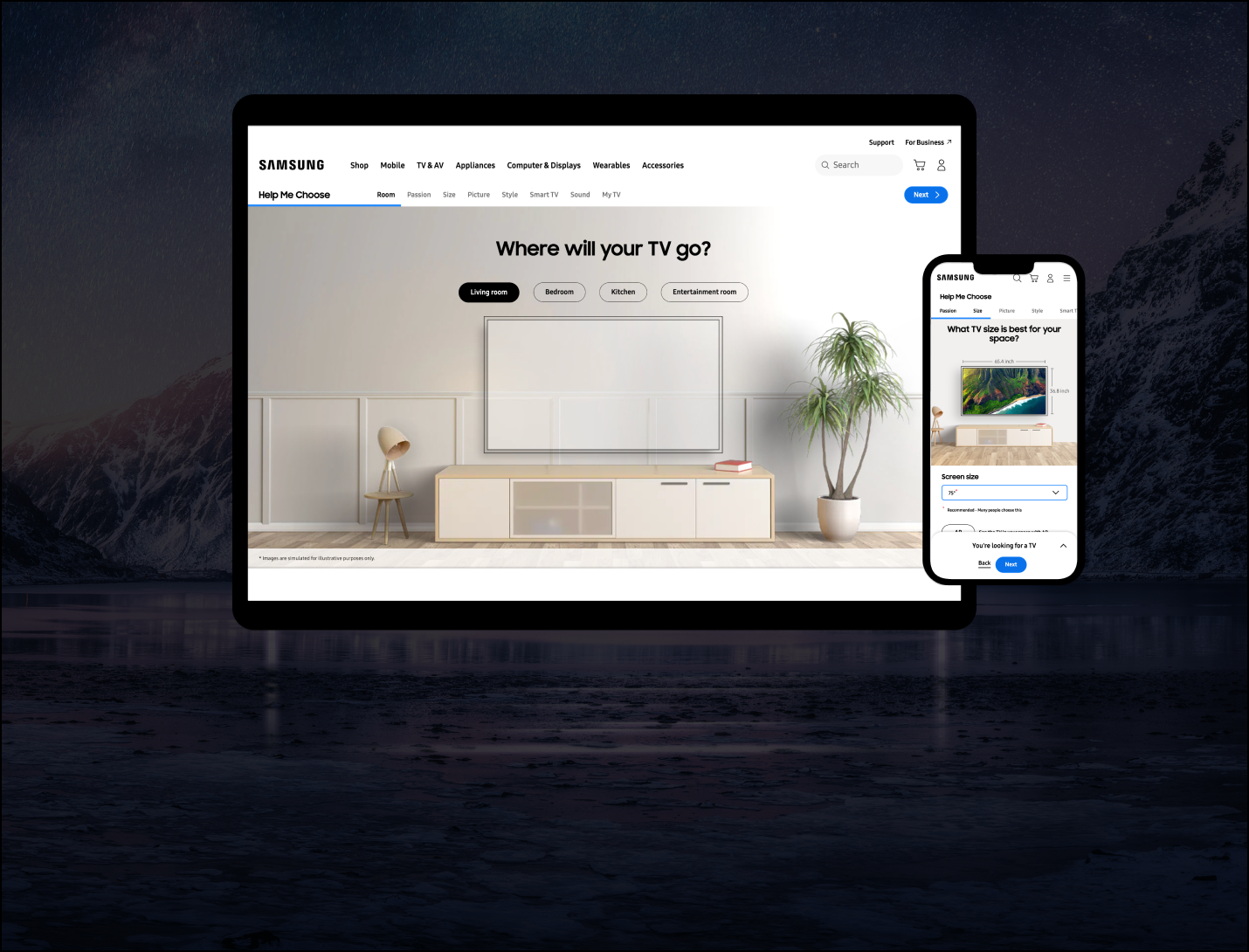
Where will your TV go?
The journey opens with the most concrete question in the whole purchase: living room, bedroom, kitchen, outdoors, or entertainment room. The shopper's answer doesn't just personalise copy — it sets the literal backdrop they'll see the TV sized and styled against for the rest of the experience, designed like a model home rather than a product page.

Step 2 | Your Size and Preference
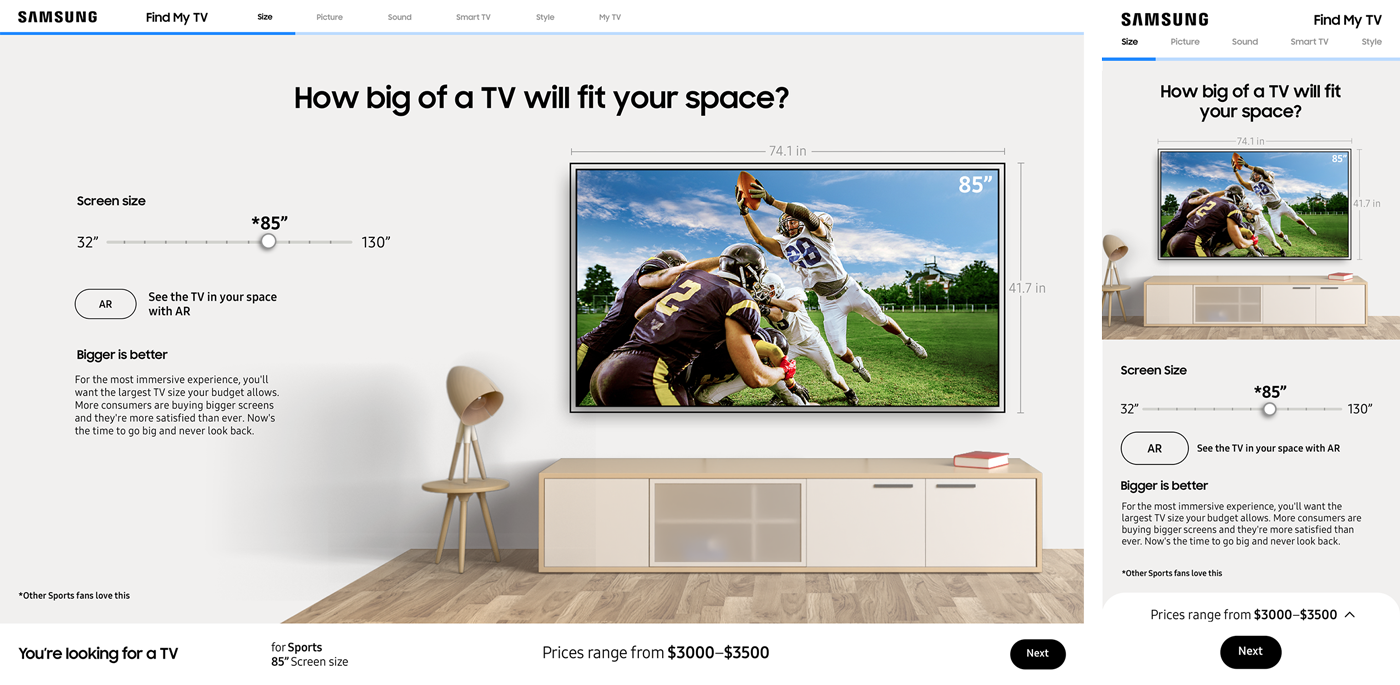
A TV that grows in your room
Once the shopper named a passion — sports, gaming, movies, décor — that interest carried through every visual in the journey, screen fills, demo content, even the imagery used to illustrate resolution. The size slider scaled the TV live inside the shopper's chosen room photograph, with an AR option to drop the actual dimensions into their own space through their phone camera.
Dynamic slider populated from the live regional SKU range, not a fixed scale
Room imagery and scale shift realistically as screen size grows toward 130"
Web AR opens directly from the slider for an in-space, real-world check
Step 3 | Your Picture Quality
How brilliant do you want your picture?
Resolution is the hardest spec to sell because most shoppers can't visualise the difference between FHD, 4K and 8K from a number alone. We replaced the number with a live magnified comparison rendered against the shopper's own passion imagery — sport, film, gaming, décor — so the upgrade became something they could see, not something they had to trust.
Demos played inline as muted autoplay video, giving shoppers the option to go deeper on features like Smoother Motion or Vivid Colour without ever leaving the flow.

Step 4 | Your Style
Design as a deliberate, draggable choice.
The final stage let shoppers explore Samsung's design language — Infinity Screen, Frame, Iconic, Rotating, Projector — through a 360-degree image they could physically drag to rotate. Each style swapped in its own description and feature set in real time, ending in a running summary bar showing exactly what TV they'd built and its live price range.

Reflection
A configurator only earns its name if every screen feels like the customer's choice
01
Translating specs into lived scenarios converts far better than translating specs into plainer language — the room and passion framing did more work than any copy edit could.
03
A persistent price and selection summary reduced the anxiety of a multi-step flow — shoppers always knew exactly where they stood and what it would cost.
02
Building a playbook alongside the live product was non-negotiable for a 26-market rollout — without it, regional teams would have rebuilt the logic, not just localised the content.
04
Designing for localisation from day one — dynamic sliders, swappable imagery, market-specific SKU logic — meant regions could adapt the tool without touching code.
Design Management
A playbook to take the tool global
A first-of-its-kind tool only stays consistent if every region understands the thinking behind it, not just the surface. I authored the Find My TV Experience Playbook — a 61-page specification covering experience strategy, every interactive stage, localisation rules for imagery and copy, and exact technical boundaries for what regional teams could and couldn't adapt.
The playbook drew a hard line between what was fixed (navigation logic, interaction patterns, core flow) and what was flexible (passion imagery, demo content, translated copy) — giving 20+ markets the confidence to localise without breaking the experience.
Team
A multi-disciplinary studio, working as one
As Group Creative Director on the One Publicis Team Samsung account, I led the experience design, UI and content strategy disciplines directly, working in lockstep with VFX, production and a wider non-managed team spanning strategy, delivery and analytics.
Experience & design
Chief Creative Officer Anthony Yell
EVP, Executive Creative Director Nick Gawith
Group Creative Director, Experience Tim Wolf
Experience Director Chad Thomas
Senior UI Designer Sam Stringer-Hye
Senior UX Designer Jess Luszcz
Content & production
Content Strategy Director Chris Haines
Senior Copy Writer Ainsley Waller
VFX Director Jason Furhman
Color / Finish Andrew Tate
Sound / Music Paul Gomez